ADHD Cricket Support


What is ADHD Cricket?
Do you have trouble keeping your attention on what you are supposed to be doing? Then use this app. Write yourself a 'Things to Do' list and start working on the top item. Then at the intervals you define the app will produce a gentle chirp to remind you to refocus on whatever you were supposed to be working on. It runs all through your working day, even with the phone locked and in your pocket. You don't have to restart it every day. Set it once then it will continue until you switch it off.
Simple!
Setting it up for the first time
- Install and open the app.
- Allow the permissions it asks for. This bit matters, so don’t skip it:
- On iPhone, allow notifications. iPhones only let the chirp sound while the phone is locked by playing it through a notification. No permission, no chirps when the screen is off.
- On Android, allow notifications and say yes when it asks to ignore battery optimisations. That second one stops your phone quietly killing the app in the background to save power.
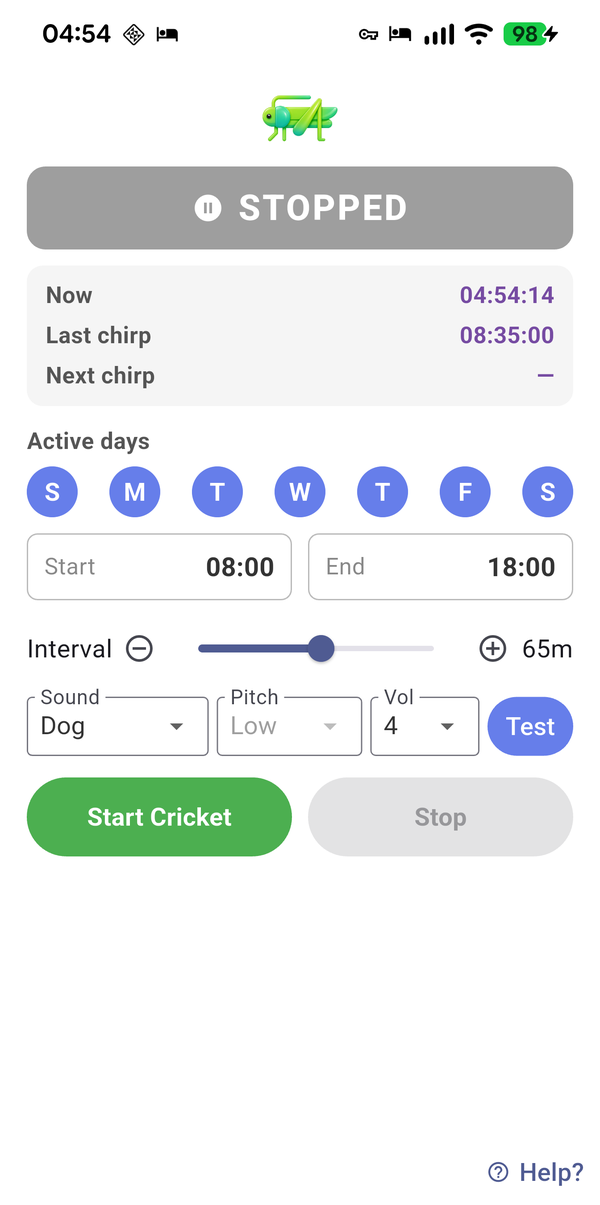
- Pick your active days. Tap the seven circular day buttons to turn days on or off. Out of the box it’s Monday to Friday.
- Set your active hours. Tap the Start and End time chips and pick your working window. The default is 08:00 to 17:00. The app stays silent outside these hours.
- Choose your interval. Drag the slider anywhere from 5 to 120 minutes. Every 30 minutes is a good starting point.
- Choose your sound, pitch, volume. Then tap the little Test button to hear your choice straight away.
- Tap the green Start Cricket button. The banner at the top turns green and says RUNNING. You’re done.
While it’s running
The times card shows three things: the time now, when the last chirp happened and when the next one is due, with a countdown. You don’t need to keep the app open. Lock the phone, put it down and get on with your day.
Chirps land on a fixed grid counted from your start time. Start at 08:00 with a 30 minute interval and it chirps at 08:00, 08:30, 09:00 and so on until your end time.
Want to change a setting? The controls are locked while a session is running. Tap the red Stop button first, make your change, then tap Start Cricket again. The Test button works at any time.
If you can’t hear the chirps
- iPhone: check notifications are allowed for ADHD Cricket in Settings. Without them, chirps can’t play while the phone is locked. Opening the app now and then also tops up its schedule of upcoming chirps.
- Android: check the app is excluded from battery optimisation. Some phones (Samsung and Motorola especially) are ruthless with background apps.
- Any phone: the chirp plays on the alarm sound channel, so it works even when media volume is low. But a phone in full silent or Do Not Disturb mode with alarms muted will stay silent. Check your volume settings and try the Test button.
- Still stuck? The chirp volume in the app might just be set low. Nudge it up and test again.
A tip that makes it work better
Keep a notepad next to you. When a chirp catches you off task, jot down what you were doing before you switch back. After a week you’ll have a surprisingly honest map of where your time actually goes.
Need help?
Email thomas@thomasdstoker.com with your phone model and a short description of the problem. A screenshot helps.
Apple and the Apple logo are trademarks of Apple Inc. Google Play and the Google Play logo are trademarks of Google LLC.