ADHD Pomodoro Support


Some jobs you just can’t start. Not because they’re difficult but because they’re dull or slightly daunting and suddenly it seems super important to vacuum the whole house and reorganise the arrangement of your indoor plants. That’s what the Pomodoro technique is for.
It’s named after a tomato. Francesco Cirillo came up with it in the late 1980s as a student and timed himself with one of those wind-up kitchen timers shaped like a pomodoro.
It works because you’re not committing to finish the thing. Only to 25 minutes of it. Once you’re in momentum usually does the rest. The break at the end is what stops the whole thing collapsing by mid-afternoon.
What is ADHD Pomodoro?
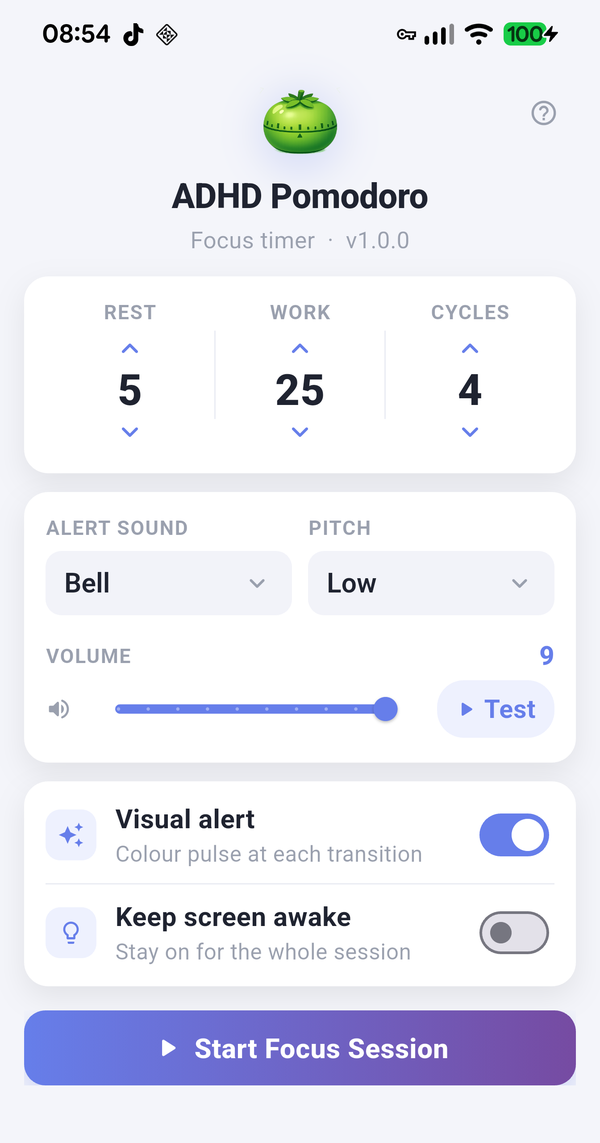
ADHD Pomodoro is a focus timer built around one simple idea: work in short bursts with proper breaks in between. You tell it how long to work, how long to rest and how many rounds to do. It counts down, sounds an alert at every switch and shows you exactly where you are with two big progress bars. Once you press Start it needs nothing more from you.
The classic recipe is 25 minutes of work and 5 minutes of rest, repeated four times. Those are the defaults, so you can just press Start and go.
Setting up a session
Everything is configured on the first screen before you start:
- Work Duration - how many minutes each work period lasts. Anything from 1 to 60 minutes. Default is 25.
- Rest Duration - how long each break lasts, also 1 to 60 minutes. Default is 5.
- Number of Cycles - how many work-plus-rest rounds you want, from 1 to 20. Default is 4.
- Alert Sound - pick the sound that plays at every switch between work and rest. Use the preview to find one you like.
- Alert Volume - how loud that alert is.
- Visual Indicator - when this is on the screen gives three slow one second colour pulses at each switch. Gentle by design, with no rapid flashing. Handy if your phone is on silent.
- Keep Screen Awake - stops the screen sleeping during the session so you can watch the bars tick down from across the desk.
One thing worth knowing before you start: if your phone is on silent you may not hear the alert. Turn on Keep Screen Awake and watch for the colour pulse instead.
When you’re happy, tap Start.
During a session
The running screen shows a big WORK or REST label so you always know which mode you’re in. Below it sit two progress bars: green for work and blue for rest. The active bar starts full and drains from right to left as time runs out. The other bar waits in grey. Underneath, a counter shows where you are, for example Cycle 3 of 4.
Each work period runs down, the alert sounds, and rest begins automatically. When rest ends it rolls straight into the next work period. No tapping required between phases. After the final rest the app plays a completion signal and shows Complete. Session done.
Three buttons are available while it runs:
- Pause - freezes the countdown where it is.
- Resume - carries on from where you paused.
- Stop Session - abandons the session and returns to the setup screen. It asks you to confirm first so a stray tap can’t wipe out your progress.
Does it work with the screen off?
Yes. The alert still sounds when the app is in the background or the phone is locked, so you can start a session and put the phone face down. The on-screen bars and countdown only update while the app is open, which is what Keep Screen Awake is for.
If you can’t hear the alerts
- Check your phone isn’t in silent or Do Not Disturb mode with alarms muted. The alert uses the alarm sound channel so ordinary media volume doesn’t affect it.
- Check the Alert Volume setting in the app.
- On Android, if alerts stop when the phone is locked, allow the app to ignore battery optimisations in your phone settings.
- If all else fails, turn on the Visual Indicator and Keep Screen Awake and let the screen do the talking.
Need help?
Email thomas@thomasdstoker.com with your phone model and operating system version and a short description of the problem. Replies normally take a couple of days.
Apple and the Apple logo are trademarks of Apple Inc. Google Play and the Google Play logo are trademarks of Google LLC.